
If you’re automating backups, writing scripts, or integrating Proxmox Backup Server (PBS) with other systems, API tokens are the correct way to authenticate — not passwords.
This guide shows exactly how to create an API token in PBS, why you should use one, and how to use it safely with proxmox-backup-client.
Simple, secure, and production-ready.
Why Use API Tokens in Proxmox Backup Server?
Using a user password in scripts is risky:
- ❌ Passwords expire or get rotated
- ❌ Full user access is overkill
- ❌ Scripts break silently
- ❌ Higher blast radius if leaked
API tokens solve this:
- ✅ Scoped permissions
- ✅ Revocable without touching the user
- ✅ Perfect for automation
- ✅ Designed for non-interactive use
If you’re running backups from Proxmox VE, cron jobs, or custom scripts — tokens are mandatory best practice.
Prerequisites
Before creating a token, make sure you have:
- A working Proxmox Backup Server
- Admin or permission to manage users
- A user account (local or PAM)
Example user:
pve@pbs
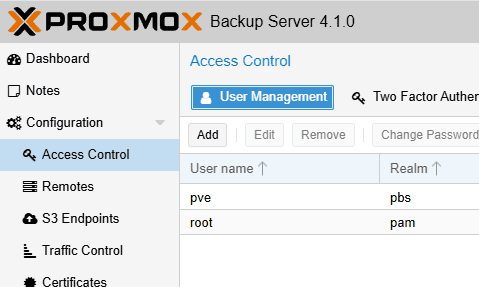
Step 1: Log In to the PBS Web Interface
- Open your browser and go to your PBS web UI:
https://<pbs-ip>:8007
- Log in with an admin-capable user
Step 2: Create an API Token
- Navigate to:
Configuration→ Access Control→ API Tokens
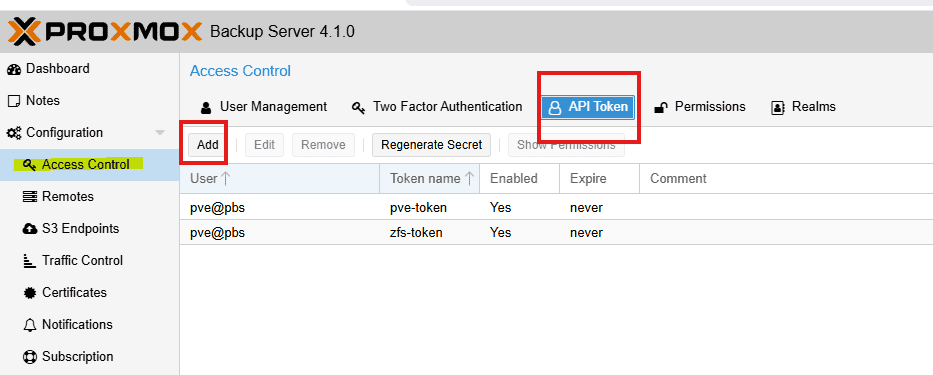
- Click Add
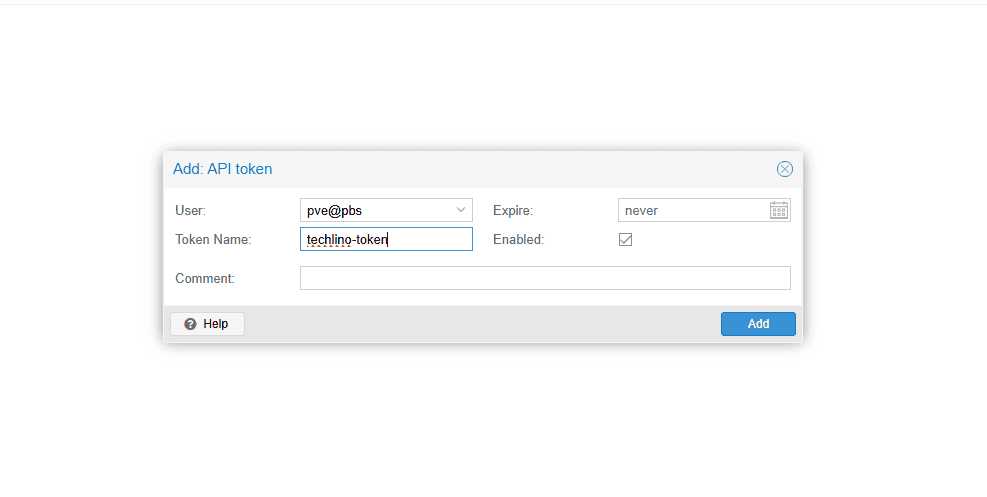
- Fill in the fields:
- User:
pve@pbs - Token ID:
zfs-backup(example)
- Click Create
📌 Important:
- The token secret is shown once
- Copy it immediately
- You cannot recover it later
Step 3: Assign Permissions to the Token
Creating a token is not enough — it has no permissions by default.
Recommended Permission Setup
- Go to:
Configuration→ Access Control→ Permissions- Add a permission for user and another one for API token:
- Path:
/datastore/pbs-store - User:
pve@pbs - Role:
DatastoreBackup/DatastoreAdmin
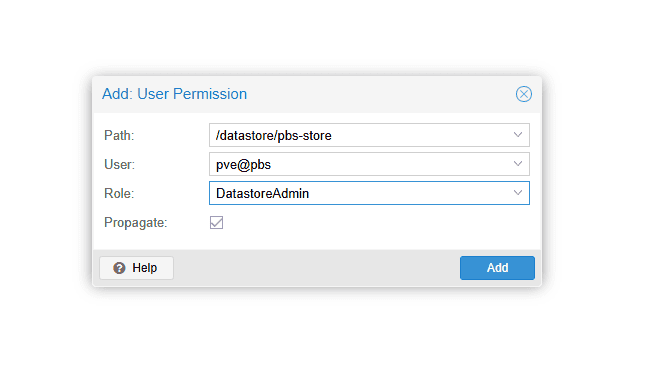
3. Add a permission for the API token:
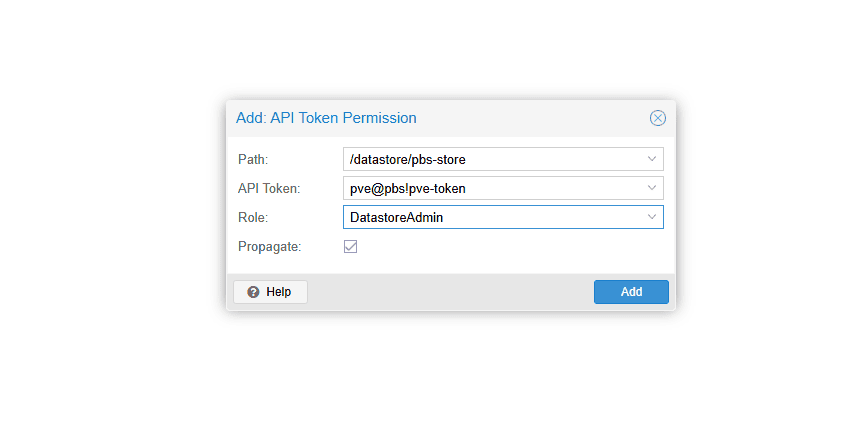
This allows:
- Creating backups
- Reading snapshots
- No admin access
✅ Principle of least privilege
Step 4: Verify Token Authentication
Test the token from a shell:
export PBS_REPOSITORY="pve@[email protected]:pbs-store"
export PBS_PASSWORD="<TOKEN_SECRET>"

proxmox-backup-client list
If authentication works, you’ll see datastore content.
Recommended: Use a Password File
Never hardcode secrets in scripts.
echo '<TOKEN_SECRET>' > /root/pbs-password
chmod 600 /root/pbs-passwordThen:
export PBS_PASSWORD_FILE="/root/pbs-password"This is exactly how production backup scripts should authenticate.
Common Mistakes (and How to Avoid Them)
Token Created but Backups Fail
Cause: No permissions assigned
Fix: Assign DatastoreBackup role to the token
Using the User Instead of the Token
Wrong:
pve@pbs@pbs-store
Correct:
pve@pbs!zfs-backup@pbs-store
The !token-name part is required.
Token Has Too Much Power
Avoid assigning:
AdminDatastoreAdmin
Unless absolutely required.
Security Best Practices
- Use one token per purpose
- Rotate tokens periodically
- Set expiration dates
- Store secrets in root-only files
- Never commit tokens to Git
When to Use Multiple Tokens
Create separate tokens for:
- Proxmox VE backups
- Dataset backups
- External systems
- CI/CD or automation
This makes auditing and revocation trivial.
Final Thoughts
If you’re still using passwords with Proxmox Backup Server, stop.
API tokens are:
- Safer
- Cleaner
- Easier to manage
- Built for automation
Once you switch, you’ll never go back.
Happy (and secure) backing up 🔐

I’m a software engineer with roots in embedded systems and a growing focus on DevOps and self-hosted infrastructure. CKA certified, CCNA background, and a homelab that never sleeps — running Proxmox, Kubernetes, Docker, Coolify, and more. On techlino.net I share practical guides on Linux, virtualization, and infrastructure built from real experience.
[…] Tokens = no root passwords in scripts (See our post about creating PBS token) […]
[…] you can use username + password, it is better to create an API token, it is more secure and better for scripts. Take a look at this article for how to create one: How […]