
- Part 1: Architecture & Strategy
- Part 2: Installing Proxmox VE on ZFS Properly
- Part 3: Running PBS in a VM on Your Main PC
- Part 4: Automated ZFS Snapshots with Sanoid
- Part 5: ZFS Replication Using Syncoid
- Part 6: Backing Up VMs to Proxmox Backup Server
- Part 7: Telegram Notifications for PVE & PBS
- Part 8: Full Backup Automation Scripts
- Part 9: Disaster Recovery Simulation
Automating backups in a Proxmox + ZFS environment is crucial for reliability, consistency, and peace of mind. Manual backups are slow and error-prone, but with a fully scripted workflow, you can ensure that snapshots, replication, VM backups, and notifications run seamlessly in the background. This guide will show you how to implement a real-world, modular backup automation system for your intermediate homelab.
What You’ll Learn
- Automating ZFS dataset snapshots with Syncoid
- Backing up Proxmox VMs to Proxmox Backup Server (PBS)
- Integrating pre-backup preparation scripts and wake-on-LAN
- Handling locks, errors, and concurrent jobs
- Sending real-time Telegram notifications
- Automating post-backup cleanup and sleep re-enablement
Why Automate Backups?
- Avoid human error — never forget a backup
- Maintain consistent retention policies
- Reduce downtime with fast, reliable restores
- Make your workflow copy-paste ready for all servers
Core Components
Your backup automation system consists of several scripts, each with a clear purpose:
| Script | Purpose |
|---|---|
zfs-backup.sh | Main orchestrator for snapshots, PBS sync, and VM backup prep |
prepare-for-backup.sh | Wakes PBS, ensures it’s online, disables sleep |
wait-for-pbs.sh | Polls PBS until reachable before syncing |
enable-sleep-no-jobs.sh | Re-enables sleep after backup jobs finish |
disable-sleep.sh | Disables sleep mode on PBS during backups |
mmd_wol.sh | Sends Wake-on-LAN packet to PBS |
notifications.sh | Sends Telegram alerts on success or failure |
Script Architecture & Design
Principles used:
- Modular – Each script does one thing.
- Locking & concurrency – Prevents multiple backups from overlapping.
- Logging – All stdout/stderr captured to a log file.
- Error handling – Immediate alerts and termination on failure.
- Configurable variables – Paths, PBS host, datasets, SSH user, and timeouts.
Example structure for zfs-backup.sh:
zfs-backup.sh
├── Locking
├── Wait for vzdump jobs
├── Backup Proxmox config
├── Wake PBS and prepare datasets
├── Sync datasets via Syncoid
├── Telegram notifications
├── Enable sleep after jobs finish
Step 1 — Prepare PBS for Backup
Before syncing, the PBS server must be online and awake. This is handled by prepare-for-backup.sh:
#!/usr/bin/env bash
set -euo pipefail
source ~/scripts/wait-for-pbs.sh
RUN_WOL=~/scripts/mmd_wol.sh
PBS_SSH="[email protected]"
DISABLE_SLEEP_SCRIPT="~/scripts/disable-sleep.sh"

"$RUN_WOL"
wait_for_pbs
ssh "$PBS_SSH" "$DISABLE_SLEEP_SCRIPT"
This script:
- Sends a Wake-on-LAN packet to PBS (
mmd_wol.sh) - Waits until PBS responds (
wait-for-pbs.sh) - Disables sleep mode for the duration of the backup
Attention !
Please pay attention that disable-sleep.sh should be on the host that run PBS vm.
Step 2 — Backup Proxmox Config
Back up critical Proxmox configuration files for disaster recovery:
CFG_DIR="/mmd_server/bkp/config"
CFG_FILE="$CFG_DIR/pve-config-$(date +%F).tar.gz"

mkdir -p "$CFG_DIR"
tar -czf "$CFG_FILE" \
  /etc/pve /etc/network /etc/ssh /etc/apt /etc/fstab /etc/hosts
✅ Logs the operation and creates a timestamped archive.
Step 3 — Sync ZFS Datasets with Syncoid
SYNCOID_CMD=(
  syncoid
  --quiet
  --no-sync-snap
  --no-privilege-elevation
  --force-delete
  --recursive
)

"${SYNCOID_CMD[@]}" "$DATASET_DIR" "$PBS_HOST:$PBS_DATA"- Handles incremental ZFS replication
- Recursive dataset replication ensures all child datasets are synced
- Exit codes
0or2indicate success or “nothing new to sync”
Step 4 — Handle Concurrent Jobs & Locks
Prevent conflicts with ongoing VM backups or ZFS sends:
VZDUMP_LOCK="/var/run/vzdump.lock"
wait_for_vzdump() {
    [[ -e "$VZDUMP_LOCK" ]] || return 0
    echo "Waiting for vzdump..."
    exec 8<"$VZDUMP_LOCK"
    flock 8
    exec 8>&-
}
wait_for_vzdump- Ensures snapshots and PBS sync don’t overlap with
vzdumpjobs.
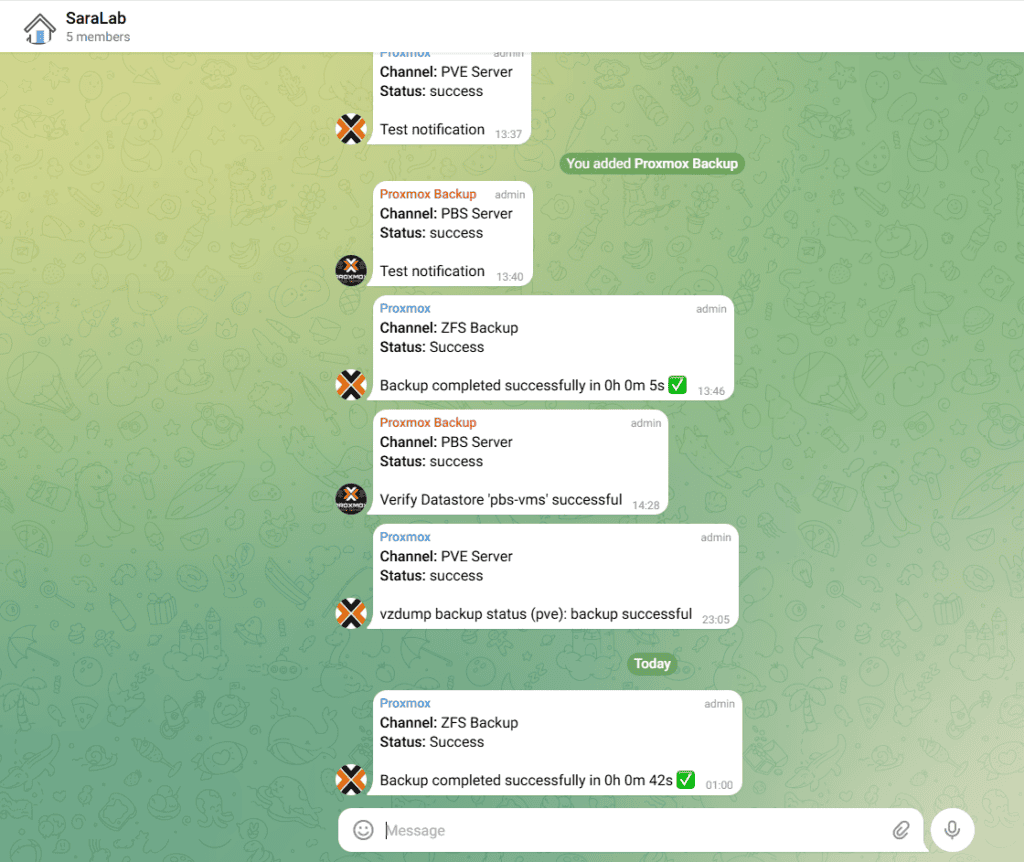
Step 5 — Notifications via Telegram
notifications.sh sends real-time alerts:
send_notification "ZFS Backup" "Success" "Backup completed successfully in $DURATION ✅"- Escapes HTML to prevent formatting issues
- Supports both success and failure alerts
- Immediate feedback keeps you informed
Result:
Step 6 — Post-Backup Cleanup
After jobs finish, sleep mode is re-enabled on PBS:
ssh "$PBS_SSH" "$ENABLE_SLEEP_SCRIPT"enable-sleep-no-jobs.sh waits for all Syncoid and vzdump jobs to finish before enabling sleep.
Visual Workflow
[Proxmox Server]
      |
      v
[Prepare PBS] ---> Wake + Disable Sleep
      |
      v
[Backup Config] ---> /mmd_server/bkp/config
      |
      v
[ZFS Dataset Sync] ---> PBS:/pbs/data_bkp
      |
      v
[VM Backups (vzdump)]
      |
      v
[Notifications via Telegram]
      |
      v
[Enable Sleep on PBS]
Best Practices & Lessons Learned
- Lock everything – Prevent overlapping backups
- Use modular scripts – Easier maintenance and updates
- Log everything – Facilitates troubleshooting
- Test restores regularly – A backup is only useful if it restores
- Keep PBS awake during backups – Avoid failed jobs due to sleep
Access the Scripts
All scripts in this guide are available in my GitHub repository:
https://github.com/mdahamshi/proxmox-scripts
Part 9 Preview — Disaster Recovery Simulation
Part 9 will take everything you’ve automated so far and test a full disaster recovery scenario. You’ll simulate a failure on your Proxmox host, restore your ZFS datasets from PBS, recover VM backups, and validate that all notifications and scripts function correctly. This step ensures that your automated workflow is not just theoretical — it’s battle-tested and reliable.
- Part 1: Architecture & Strategy
- Part 2: Installing Proxmox VE on ZFS Properly
- Part 3: Running PBS in a VM on Your Main PC
- Part 4: Automated ZFS Snapshots with Sanoid
- Part 5: ZFS Replication Using Syncoid
- Part 6: Backing Up VMs to Proxmox Backup Server
- Part 7: Telegram Notifications for PVE & PBS
- Part 8: Full Backup Automation Scripts
- Part 9: Disaster Recovery Simulation

Mohammad Dahamshi is a skilled Embedded Software Engineer and web developer. With experience in C/C++, Linux, WordPress, and DevOps tools, he helps businesses solve technical challenges and build reliable digital solutions. Fluent in Arabic, Hebrew, and English, he also runs Saratec, offering web design and digital marketing services.
[…] in the Series: In Part 8, we’ll take everything we’ve covered so far—ZFS snapshots, Syncoid replication, VM backups, […]