
Self-hosting doesn’t usually fail because of bad software.
It fails because everything is forced through the wrong network path.
I learned this the hard way—first with Immich uploads, then with Nextcloud sync issues, and finally with Jellyfin buffering that made Netflix look fast.
This post is the architecture I ended up with after fixing all of that.
It’s boring. Predictable. And it just works.
The recurring mistake in self-hosting
Most self-hosted setups start like this:
“I want access from anywhere, so I’ll expose everything through Cloudflare.”
And for a while… it works.
Until:
- uploads get large
- sync clients stay connected for hours
- media streaming gets involved
- WebDAV shows up
That’s when Cloudflare Tunnel stops being a solution and starts being a bottleneck.
Not because Cloudflare is bad — but because it’s being used as the wrong tool.
The core principle
Separate traffic by purpose, not by app.
Ask one simple question for every request:
“Does this need to be public?”
If the answer is no, it should never touch Cloudflare.
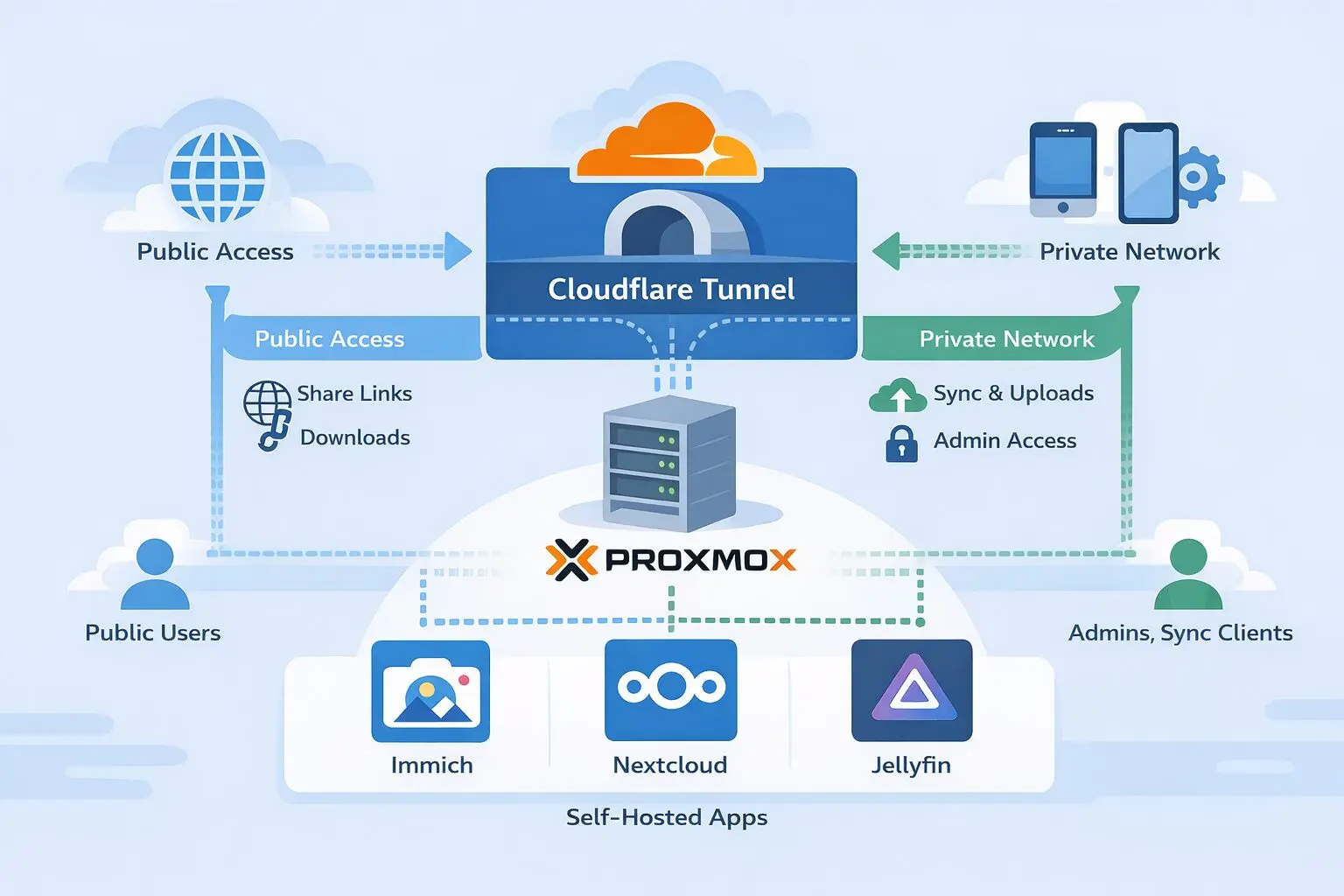
The Architecture (high level)
This is the model used across Immich, Nextcloud, Jellyfin, and anything similar.
Public Access Layer — Cloudflare Tunnel
Used only for:
- Public share links
- Read-only access
- File drop links
- Landing pages
Never used for:
- Large uploads
- Sync clients
- Media streaming
- Admin access
Private Access Layer — Tailscale (Subnet Router)
Used for:
- Desktop sync clients
- Mobile apps
- WebDAV
- Admin panels
- Large uploads
- Media streaming
Fully encrypted, no open ports, no reverse proxy limits.

Control Plane — Proxmox
- Tailscale installed once
- Proxmox advertises VM subnets
- All VMs are reachable privately
- Zero need to install Tailscale inside each VM
How each app fits this architecture
Immich
- Public: shared albums via Cloudflare
- Private: mobile backups + uploads via Tailscale
- Why: Immich hates proxies during uploads
Nextcloud
- Public: share links, file drops
- Private: sync clients, WebDAV, admin
- Why: works behind proxies, but works better without them
Jellyfin
- Public: optional landing page only
- Private: all streaming via Tailscale
- Why: Cloudflare and video streaming are not friends
Security benefits (without extra effort)

This setup gives you:
- WireGuard encryption (Tailscale)
- No exposed ports
- Cloudflare hides your real IP
- Access control via Tailscale ACLs
- Smaller attack surface
You end up more secure with less configuration.
Why this scales so well
Add a new app?
- Decide: public or private
- Attach it to the right path
- Done
New VM?
- Already reachable via subnet routing
New device?
- Install Tailscale
- You’re in
No re-architecting. No rewrites.
What this architecture avoids (intentionally)
- No port forwarding
- No exposing Proxmox UI publicly
- No forcing uploads through Cloudflare
- No installing Tailscale in every container
- No fighting timeout limits
Final takeaway
Cloudflare Tunnel is excellent at visibility.
Tailscale is excellent at connectivity.
Proxmox is excellent at control.
When each tool does its job — self-hosting becomes calm again.
Up next in the series:
- Immich Upload Limit Fix: Cloudflare Tunnel + Tailscale on Proxmox (Best Practice)
- Nextcloud, Cloudflare, and Tailscale: How I Finally Stopped Fighting Upload Limits
- Jellyfin, Cloudflare, and Tailscale: Stop Buffering and Streaming Headaches
If you self-host and have ever said “this should be simpler” — this series is for you.

Mohammad Dahamshi is a skilled Embedded Software Engineer and web developer. With experience in C/C++, Linux, WordPress, and DevOps tools, he helps businesses solve technical challenges and build reliable digital solutions. Fluent in Arabic, Hebrew, and English, he also runs Saratec, offering web design and digital marketing services.
[…] post is part of the Self-Hosting Without Pain seriesA real-world guide to running Immich, Nextcloud, Jellyfin, and more using Cloudflare, […]
[…] post is part of the Self-Hosting Without Pain seriesA real-world guide to running Immich, Nextcloud, Jellyfin, and more using Cloudflare, […]
[…] post is part of the Self-Hosting Without Pain seriesA real-world guide to running Immich, Nextcloud, Jellyfin, and more using Cloudflare, […]