
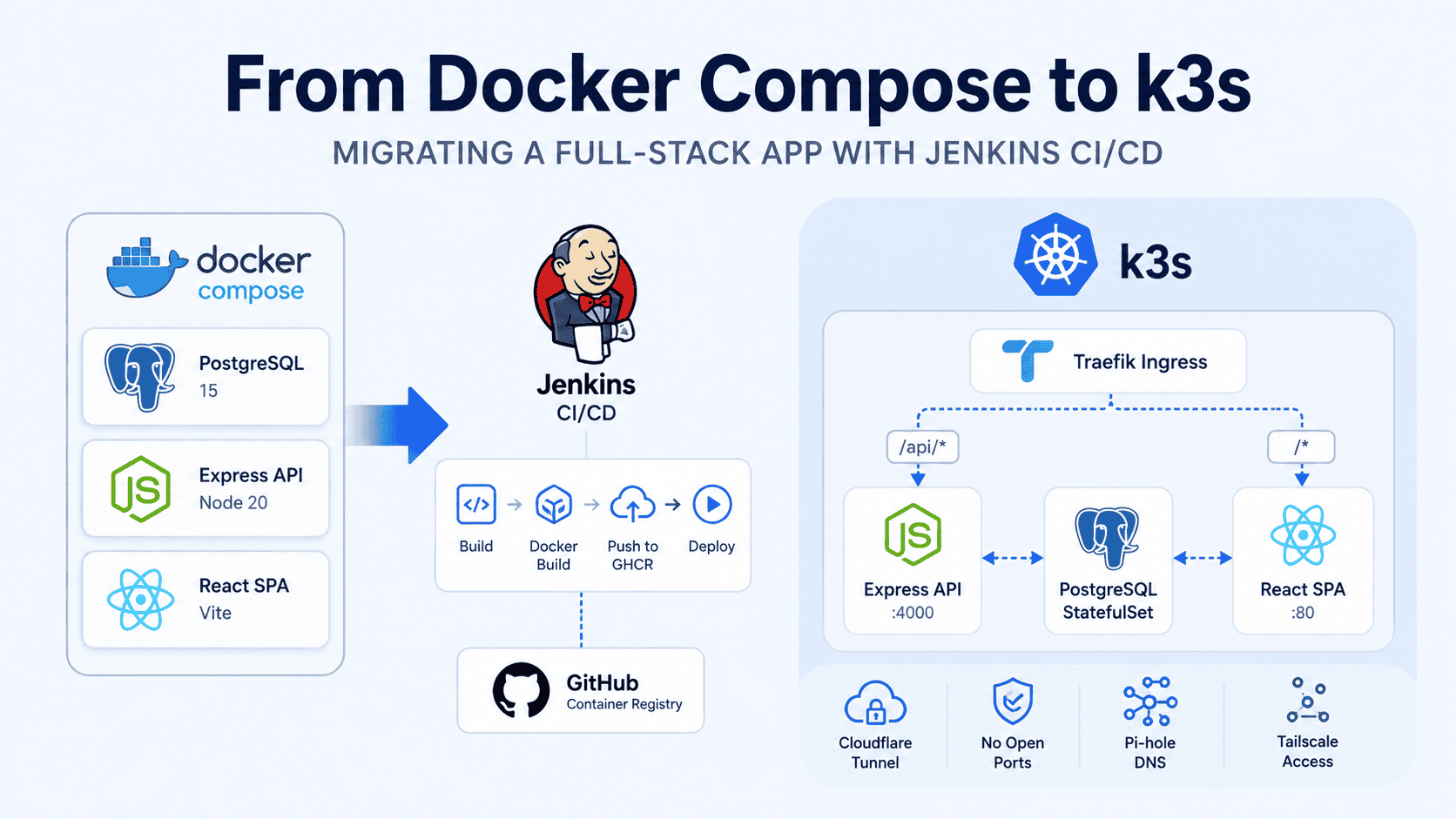
Six months ago, my app was running on Coolify behind a Cloudflare Tunnel. Deploys were automatic — every push to my self-hosted Gitea triggered a webhook, Coolify picked it up, rebuilt the Docker Compose stack, and shipped it. It worked. But there was no staging environment, no test gate before production, and no visibility into what was running where. This is the story of replacing that with something I actually understand end to end.
The Starting Point
The app was simple enough: a React SPA built with Vite, an Express API with Passport.js authentication, and PostgreSQL for data and sessions. Three services, one network, a persistent volume for Postgres — deployed on Coolify, running on a Proxmox VM. Cloudflare Tunnel handled HTTPS and zero-trust access with no firewall ports open.
docker-compose.yml
├── postgres:15        # database
├── server             # Express API (Node 20)
└── client # Nginx serving React SPACoolify handled deploys automatically — a push to Gitea triggered a webhook, Coolify rebuilt and restarted the stack. No SSH, no manual commands. For a solo side project, that’s genuinely good enough.
But Coolify’s abstraction hides the details. There was no staging environment — every push went straight to production. No test gate. No visibility into container state beyond Coolify’s UI. And if I ever wanted to move off Coolify, the entire deployment model lived inside it, not in my repository.
That was the real motivation: I wanted to learn k3s, Kustomize, and Jenkins CI/CD on something real — and own the full pipeline in code, not in a PaaS UI. A toy tutorial app doesn’t teach you the sharp edges. A production app does.
The New Stack
Here’s what I built:
Internet → Cloudflare Tunnel → k3s Node → Traefik Ingress
                                                                                    ├── /api/*  → server:4000
                                                                                    └── /*       → client:80
k3s — single-node, lightweight, perfect for a homelab. It ships with Traefik as the default Ingress controller, so there’s no extra setup needed.
Jenkins — running in a Docker container on Coolify. The pipeline handles everything from build to production deploy.
GHCR — GitHub Container Registry for storing the two images: top-members-client and top-members-server.
Kustomize — three-layer structure: base/, staging/, and prod/. Same manifests, different config per environment.
Writing the Kubernetes Manifests
Client: Multi-Stage Build, Simplified Nginx
The React SPA is built with a two-stage Dockerfile. The builder stage compiles the Vite app; the runtime stage is just nginx:alpine serving the output:
FROM node:20-alpine AS builder
WORKDIR /app
COPY . .
RUN npm install && npm run build

FROM nginx:alpine
LABEL org.opencontainers.image.source=#your repo url
COPY --from=builder /app/dist /usr/share/nginx/htmlThe original Docker Compose setup used Nginx to both serve static files and proxy /api/ requests to the backend. In Kubernetes, that proxy job moves to the Ingress controller. So the Nginx config becomes much simpler — serve files and handle SPA routing, nothing else:
server {
    listen 80;
    root /usr/share/nginx/html;
    index index.html;
    location / {
        try_files $uri $uri/ /index.html;
    }
}This config is injected via a ConfigMap at deploy time, which means the same Docker image works in both Compose and Kubernetes environments. The routing concerns are cleanly separated: Nginx owns static files, Traefik owns routing decisions.
Server: InitContainer for Database Readiness
The Express API was straightforward to containerize. The important addition was an InitContainer that waits for PostgreSQL to be ready before the main app starts — something depends_on: condition: service_healthy handled in Compose:
initContainers:
  - name: wait-for-postgres
    image: postgres:15
    command:
      - sh
      - -c
      - until pg_isready -h postgres -U "$POSTGRES_USER"; do
echo waiting for postgres; sleep 2; doneUsing pg_isready (from the Postgres image itself) is more reliable than a raw nc TCP check — it actually verifies Postgres is accepting connections, not just that the port is open.
PostgreSQL: StatefulSet + PVC
The database runs as a StatefulSet with a PersistentVolumeClaim. k3s ships with a local-path provisioner, so the PVC is satisfied automatically without configuring any storage classes:
apiVersion: apps/v1
kind: StatefulSet
metadata:
  name: postgres
spec:
  serviceName: postgres
  replicas: 1
  selector:
    matchLabels:
      app: postgres
  volumeClaimTemplates:
    - metadata:
        name: postgres-data
      spec:
        accessModes: ["ReadWriteOnce"]
        resources:
          requests:
storage: 1GiThe schema is applied automatically via a ConfigMap mounted at /docker-entrypoint-initdb.d — the same pattern PostgreSQL uses in Docker. Any .sql files in that directory are executed on first startup.
Seed data — which contains bcrypt password hashes — is handled separately with a one-shot Kubernetes Job. That Job is generated by a local helper script and never committed to Git. This keeps sensitive data out of version control while still making the seed process reproducible.
Ingress: Routing Without proxy_pass
The Ingress resource replaces what proxy_pass /api/ used to do inside the Nginx container:
apiVersion: networking.k8s.io/v1
kind: Ingress
metadata:
  name: top-members
spec:
  rules:
    - host: top-members.k3.l
      http:
        paths:
          - path: /api/
            pathType: Prefix
            backend:
              service:
                name: server
                port:
                  number: 4000
          - path: /
            pathType: Prefix
            backend:
              service:
                name: client
                port:
                  number: 80
    - host: top-members-k3s.sarawebs.com
      http:
        paths:
          - path: /api/
            pathType: Prefix
            backend:
              service:
                name: server
                port:
                  number: 4000
          - path: /
            pathType: Prefix
            backend:
              service:
                name: client
                port:
number: 80Adding the public domain later required zero additional Traefik config — just an extra host entry pointing to the same services. Traefik routes based on the Host header.
Pi-hole resolves *.k3.l locally. Cloudflare Tunnel connects the public hostname to Traefik’s port. Still no open firewall ports.
Secrets
All sensitive values live in a Kubernetes Secret that is never committed to Git:
apiVersion: v1
kind: Secret
metadata:
  name: top-members-secrets
type: Opaque
stringData:
  POSTGRES_DB: saramsg
  POSTGRES_USER: saramsg
  POSTGRES_PASSWORD: <redacted>
  DATABASE_URL: postgres://saramsg:<redacted>@postgres:5432/saramsg
  MEMBERSHIP_PASSCODE: <redacted>
SESSION_SECRET: <redacted>An example-secrets.yaml template with dummy values is committed to the repo so new environments are easy to set up. The real secret is created with kubectl create secret and stays out of version control entirely.
Kustomize: One Base, Two Environments
The manifest structure follows the standard base/overlay pattern:
k8s/
├── base/
│   ├── client-deployment.yaml
│   ├── client-service.yaml
│   ├── server-deployment.yaml
│   ├── server-service.yaml
│   ├── postgres-statefulset.yaml
│   ├── postgres-service.yaml
│   ├── ingress.yaml          # placeholder host
│   ├── configmap.yaml
│   ├── nginx-configmap.yaml
│   ├── db-init-configmap.yaml
│   └── kustomization.yaml
├── staging/
│   ├── namespace.yaml
│   ├── ingress-patch.yaml    # host: app-staging.k3.l
│   └── kustomization.yaml
└── prod/
    ├── namespace.yaml
    ├── ingress-patch.yaml    # host: app.k3.l + public domain
└── kustomization.yamlThe staging overlay sets namespace: staging and patches the Ingress host. The prod overlay uses namespace: top-members and adds the public Cloudflare domain. The base stays environment-agnostic — no environment-specific values anywhere in it.
Image tags are injected by the Jenkins pipeline using sed. More on that below.
The Jenkins Declarative Pipeline
This was the most rewarding part of the migration. The full flow:
Checkout → Build (npm ci + vite build) → Docker Build & Push → Deploy Staging → [Manual Approval] → Deploy Prod
Build Stage
The pipeline uses a node:20-alpine Docker agent to run npm ci and npm run build. Jenkins itself never touches Node.js — it only exists inside the ephemeral container. Clean host, reproducible builds.
Docker Build & Push
Two images are built and pushed to GHCR, tagged with the Jenkins BUILD_NUMBER and latest:
docker.withRegistry('https://ghcr.io', 'github-user-pass') {
    def clientImage = docker.build("${CLIENT_IMAGE}:${IMAGE_TAG}", './client')
    clientImage.push()
    clientImage.push('latest')

    def serverImage = docker.build("${SERVER_IMAGE}:${IMAGE_TAG}", './server')
    serverImage.push()
    serverImage.push('latest')
}Tagging with the build number gives you a clean audit trail. You can always look at a running pod’s image tag and know exactly which pipeline run produced it.
Deploy to Staging
The kubeconfig is stored as a base64-encoded Secret text credential in Jenkins. At deploy time it’s decoded to a temp file, used for the deployment, then deleted:
withCredentials([string(credentialsId: 'k3s-kubeconfig', variable: 'KUBECONFIG_CONTENT')]) {
    sh '''
        echo "$KUBECONFIG_CONTENT" | base64 -d > /tmp/k3s-config
        chmod 600 /tmp/k3s-config
        sed -i 's|newTag: ".*"|newTag: "'"$IMAGE_TAG"'"|' k8s/staging/kustomization.yaml
        kubectl --kubeconfig=/tmp/k3s-config apply -k k8s/staging
        kubectl --kubeconfig=/tmp/k3s-config rollout status deployment/client -n staging --timeout=120s
    '''
}The sed command injects the current build number into the Kustomize overlay before applying it. It replaces whatever newTag currently holds, so there’s no special placeholder syntax to maintain. The rollout status call blocks until the deployment completes (or fails), which means a bad deploy fails the pipeline stage immediately.
Deploy to Prod (With Graceful Skip)
Same as staging, but with a manual approval gate and a 1-hour timeout. Critically, the timeout is wrapped in a try/catch so the pipeline finishes green if nobody approves — the build succeeded, staging is updated, and production waits for the next run:
try {
    timeout(time: 1, unit: 'HOURS') {
        input message: 'Deploy to production?', ok: 'Yes, deploy'
    }
    // ... same deploy steps as staging, pointing at prod overlay ...
} catch (Exception e) {
    echo "Production deployment skipped: ${e.getMessage()}"
}This pattern is important in practice. If you cut a build at the end of the day and nobody approves before the timeout, you don’t want a red pipeline blocking tomorrow’s work. Skip cleanly, re-run when ready.
The Real Challenges
Image Tag Injection: kustomize edit vs sed
The cleaner approach is kustomize edit set image, which modifies the kustomization.yaml in-place. The problem: it reformats the file, blowing away any comments or custom whitespace. sed is less elegant but fully predictable:
sed -i 's|newTag: ".*"|newTag: "'"$IMAGE_TAG"'"|' k8s/prod/kustomization.yamlThis requires the images block in kustomization.yaml to already have a newTag field before the pipeline runs — latest works as the default. The sed replaces only that line, preserving everything else in the file.
Old ReplicaSets Piling Up
Rolling updates leave orphaned ReplicaSets behind. After a dozen pipeline runs you’ll see something like this:
$ kubectl get rs -n top-members
NAME                  DESIRED   CURRENT   READY
client-7d9f8b6c4      1         1         1
client-6b5c7a3f1      0         0         0
client-5a4d6e2b8      0         0         0
client-4c3e5d1a7 0 0 0Two options. Quick cleanup:
kubectl delete replicaset -n top-members \
$(kubectl get replicaset -n top-members | awk '$2==0 && $3==0 {print $1}')Or the better long-term fix — set revisionHistoryLimit in your Deployments:
spec:
revisionHistoryLimit: 3Kubernetes keeps only the 3 most recent ReplicaSets automatically, which still gives you rollback capability without the clutter.
Networking: Still No Open Ports
The networking model didn’t change from the Coolify setup — it just moved up a layer:
- k3s Traefik handles Ingress routing inside the cluster
- Cloudflare Tunnel connects the public hostname to Traefik, with no inbound firewall rules
- Pi-hole resolves
*.k3.lfor local access to staging and prod - Tailscale handles remote
kubectlaccess when I’m not on the home network
Both staging (internal only) and prod (public via Cloudflare) run on the same cluster node, separated by namespace and Ingress hostname. No separate VMs, no duplicate infrastructure.
Results
| Before | After |
|---|---|
Coolify automatic compose up -d | Jenkins pipeline on every push |
| No staging environment | Full staging namespace with own Ingress |
| No container registry | GHCR with versioned images |
| Single environment | Kustomize overlays for staging + prod |
| No IaC | Full K8s manifests in Git |
| No rollback strategy | kubectl rollout undo works out of the box |
The pipeline runs in about 3 minutes from commit to staging deploy. Production requires a click but takes the same time. The entire stack — Nginx client, Express server, PostgreSQL — runs at roughly 60 MB of RAM total. Kubernetes doesn’t have to be heavyweight.
What’s Next
- Prometheus + Grafana for metrics and alerting
- Sealed Secrets or Vault for proper secret management
- Jest ESM test suite wired into the Build stage
- ArgoCD for GitOps-style reconciliation
The full manifests and documentation live in the repo under a docs/ folder covering architecture, deployment, CI/CD setup, and troubleshooting. The pattern works for any three-tier app — swap out the services and the same pipeline structure applies.

I’m a software engineer with roots in embedded systems and a growing focus on DevOps and self-hosted infrastructure. CKA certified, CCNA background, and a homelab that never sleeps — running Proxmox, Kubernetes, Docker, Coolify, and more. On techlino.net I share practical guides on Linux, virtualization, and infrastructure built from real experience.